17Feb
I noticed one day that I stopped getting any SCOM alerts in my System Center Operation Manager 2007 R2 environment. As part of my troubleshooting I found a ton of the following warnings in the Operations Manager Event viewer. I contacted Microsoft tech support and discovered that my RMS was in maintenance mode. I had put my RMS in maintenance mode for 30 minutes when I did some windows updates, but it never come out of it. After stopping maintenance mode and re-starting the System Center Management service on the Root Management Server, alerts started coming in again. The Microsoft tech told me that you should never put your RMS in maintenance mode and when I asked to have some documentation where it said that, he said it does not exist. This a tip that they have discovered in their troubleshooting. During this time the RMS was unable to process agent requests, so the agent holds on to the notifications in a buffer until it can communicate with the RMS again. If you are getting this warning on the RMS there is a good chance that you lost any alerts that the agent was unable to store in the buffer.
Event Type: Warning
Event Source: OpsMgr Connector
Event Category: None
Event ID: 20058
Date: 2/6/2010
Time: 2:00:17 PM
User: N/A
Computer:
Description:
The Root Connector has received bad packets which have been dropped. It received 8374 such packet(s) in the last five minutes
For more information, see Help and Support Center at http://go.microsoft.com/fwlink/events.asp.

Tags: SCOM, System Center Operations Manager
29Dec
As a parent, the part of Christmas that was the least fun was the cleaning up of packaging materials after opening the gift. The big clean up the day after Christmas was filled with bulky bags of plastic and styrofoam and impossible to open packaging. But this year I noticed the packaging using more cardboard for filler and recycled cardboard molds holding products in place instead of the plastic molds and styrofoam. Clean up this year was easier than previous years since most of the cardboard was folded flat. I guess manufactures have been making this eco-friendly change for a while and I have never noticed until I saw many products being opened at once. I hope this trend keeps up.
Tags: Green Christmas; eco-friendly Christmas
17Oct

Today’s generation is immersed in computer technology and will almost undoubtedly need to use a keyboard. So why not make touch typing a mandatory subject in school right up there with reading, writing, and arithmetic. That is being suggested in an article in the Telegraph http://www.telegraph.co.uk/news/newstopics/debates/6139246/Why-arent-children-taught-to-touch-type-at-school.html. There arguments for both for and against this idea. It can be argued that touch typing is as essential in the digital age as reading and writing. On the other hand, you can still get around a keyboard without knowing touch typing. I myself am more of a hunt-and-pecker than a touch typer and I am able to do my system admin job just fine. How essential is touch typing for living? It can be argued that it is a skill as necessary as being able to dress oneself or eat with utensils. Schools do not have mandatory subject in how to eat with a fork and a knife or getting dressed but somehow children learn how to do this. Grade school teachers may assist in some of these essential skills, such as tying shoes and zipping zippers, but skills that are essential for daily life may not need to be mandatory subject.
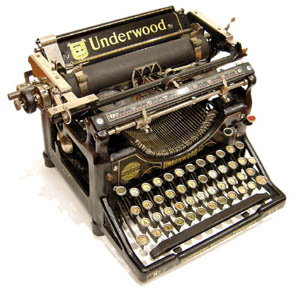
It is my opinion however that touch typing is inefficient. The QWERTY keyboard that we have become accustomed to was created when old fashioned typewriters were used. all been using for decades was developed to actually slow you down.
“The QWERTY keyboard layout was devised and created in the early 1870s by Christopher Sholes, a newspaper editor and printer who lived in Milwaukee.
With the assistance of his friends Carlos Glidden and Samuel W. Soule he built an early writing machine for which a patent application was filed in October 1867. His “Type Writer” had its printing point located beneath the paper carriage, invisible to the operator. Consequently, the tendency of the typebars to clash and jam if struck in rapid succession was especially serious, because the typist could only discover the mishap by raising the carriage to inspect what he had typed.
Sholes struggled for the next six years to perfect his invention, making many trial-and-error rearrangements of the original machine’s alphabetical key arrangement in an effort to reduce the frequency of typebar clashes. Eventually he arrived at a four-row, upper case keyboard approaching the modern QWERTY standard.” (Wikipedia http://en.wikipedia.org/wiki/QWERTY)
I’m waiting for someone to come up with a better layout that won’t cause carpal tunnel syndrome and will allow for even more words per minute than with the QWERTY keyboard layout.
Tags: QWERTY, touch typing
13Jun
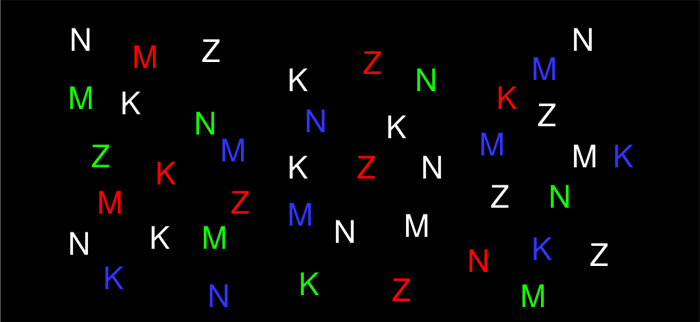
I was on the Mozilla Labs site and I found the Chomatabs project that I thought was interesting. The Firefox extension ColorfulTabs allows you to color your Firefox tabs to more easily identify the sites you are visiting. If you are like me and have at least 10 tabs open at any given time, you can see where this would be handy. There is actually a theory behind this that I found the most interesting.
In the graphic below, first find all the red letters. That was easy right!? Now find all the M’s. No so easy.
The way our visual system processes the colors versus the shapes makes finding the colors easier. The Chomatabs project was trying to take this idea further by automatically coloring tabs based on the site you visited. For instance, websites of a technical nature may be assigned a shade of green, while a commercial business site might show up as a blue tab. The concept is interesting though and one day may be use to make the organization of information a little easier. Unfortunately the project has been discontinued and is no longer under development.
https://labs.mozilla.com/projects/chromatabs/

06Feb

I installed VMWare Server 2.02 and when I tried to launch the VMWare Server Homepage icon, it opened Firefox 3.0.6 (my default browser) and I go the following error:
hostname:8333 uses an invalid security certificate.
The certificate is untrusted because it is unsigned.
To fix this in Firefox go to Options > Advanced > ENCRYPTION > View Certificates > SERVERS tab
Click Add Exception button

Type the address of your host - https://(hostname):8333
Click the Get Certificate button
Click the Confirm Security Exception button
Ensure Permanently store this exception checkbox is checked
28Jan

Gmail Logo
Google announced that they will be providing a way to get to your Gmail even is you don’t have an internet connection. From Google’s blog:
Web-based email is great because you can check it from any computer, but there’s one little catch: it’s inherently limited by your internet connection.
By using a google application called Gears, you are able to store a copy of you gmail to your local machine. It will automatically switch between “online” and “offline” if you have an unrelaiable internet connecetion. According to the blog, the feature should eb avaible in the next fw days. This would be handy for those of us who use gmail as a searchable repository.
27Jan
Microsoft is running a promotion until Jan 31 2009 where you can win a CRAY CX1 Desk-side SUPERCOMPUTER. How much geek cred would you get if you had this bad boy under your desk?! Awesome!
