• 26Jan


    The Apple iPad is light, user friendly, and offers a ton of useful applications. The popularity of the iPad with technical people iPad makes it a potential tech support tool especially when you are on the road. The iPad has built in wireless and can provide internet access from anywhere.
    However, this is not the first thing I would reach for if I were troubleshooting a server problem. The executives think the iPad is the best thing since solid state hard drives but I not sure if it’s the best tool for the job. If you just need a terminal session then it should do the job. If you are determined to use the iPad,  you could remotely control a remote computer where you had all the tools you needed to do tech support then you might be able justify using the iPad. The limiting factor for the iPad platform is  you can only install applications from the app store and it does not have the computing power to handle some tasks.  LogMeIn has an iPad application for remotely controlling a PC from the internet or you can use remote desktop if you are on a local network. This might be the deciding factor if your company has a strict software policy and does not allow the use if Log me in. Even if you remote to a another computer, the problem with Windows based applications is the iPad do not translate right-clicks and drags well and make it difficult to use.  So the verdict, you can use the iPad for a quick check on a server or PC, but an affordable netbook provides the portability and flexibility for a useful support tool.

  • 26Mar


    I got my wife a Barnes and Noble Nook for Christmas… well I ordered it before Christmas. It shipped some time in January. In any case, I was really deciding between the Nook and the Amazon Kindle. Both of them were priced the same so it was a matter of the features that was going to determine the winner. They both have the same basic functionality such as E-Ink paper-like greyscale display, free wireless network access to download books, approximatly the same size screen and weight, and the ability to play mp3s. Some key features that I thought were an advantage over the Kindle:

    • Andrioid OS
    • Expandable memory slot (you have to remove the back cover to get to it)
    • PDF and EPUB format native support
    • 802.11b Wireless (only for use at B&N… for now)
    • replaceable battery
    • Small Color LCD screen (Menu and displays book covers…in color)

    The Andriod OS has been making a splash on phones and many apps have been written for it. It is also fairly open which it was not a surprise when I found out that they hacked to nook to play Pandora over the free AT&T wireless network. Add the expandable memory slot with the 802.11b wireless capablitity and the possibilities are endless. Ok, maybe I’m overdoing it. The fact that you have a free AT&T wireless connection and an Android OS based device appeals to the hacker in me.

    As far as reading ebooks, it does what is expected. You can adjust the font, font size and contrast so text is easier to see. Reading PDFs are as easy as connecting the nook to you PC via USB and copying the PDF to the mydocuments folder on the Nook’s internal memory storage. While you have your Nook connected, you can add some family photos to the mybackgrounds folder to see a grayscale version of your photo as a screen saver. You could also add some MP3 to listen to while you read, but at mono sound and with all the other mp3 players available, why bother. Since the Nook only uses battery to change the text on the screen and to power to tiny LCD screen, the battery life is  long as expected (days between charges). However, I noticed that if you have an extending reading session, like my wife sometimes does, you will have to charge it sooner than expected. One issue I had was the Nook would not charge when using the AC adapter, but it did charge using the USB directly to the PC. I called B&N support and after talking to an English speaking person, they shipped me a new AC adapter at no charge and with no hassle.

    If you are considering an iPad versus a Nook for reading e-books, you are comparing apples to oranges. There is a distinct difference between an Apple iPad and the Kindle or Nook. That is the back-lit screen. There is a camp of people that can not spend an extended period of time reading text on a monitor or LCD. That’s why e-book readers have an advantage over a netbook or PDA. The e-ink technology is as close to reading paper as you can get and the battery life sweetens the deal. If you can spend hours reading on a monitor, don’t bother getting an e-book reader. Go out and get yourself a netbook or drop extra cash on the latest Apple gadget.

    That said, the additional features on the Nook was the deciding factor in the battle of the e-readers. The only thing that I am worried about is how the Kindle market share will effect the number of ebooks available for Nook. Hope my decision pays off. Only time will tell.

    Tags: , , , , ,

  • 24Dec


    htc-touch-pro2-verizon

    My wife recently had a chance to use the HTC Touch Pro 2 and this is what she had to say about it:

    I tested the HTC Touch Pro 2 over the past month.  My first impression of the phone was that it was surprisingly heavy.  I don’t mind electronics that have some heft to them, the phone seems sturdy, well put together and I don’t wince every time I place the phone down or worry about carrying it around.  The phone is easy to hold and comfortable in my hand.  The phone also felt a lot thicker than what I’m used to, a little bulky and cumbersome in my hand if I were to flip it over.

    The screen is really bright and very vivid on the phone.  It is definitely eye catching and the home screen has a huge clock which I really enjoy.  Sometimes, the simple things being right up front and at-a-glance are really important.  The screen is crystal clear and sharp.  The navigation at the bottom of the screen takes some getting used to, and with my settings I found that moving from the mail icon to the settings icon a bit sticky and not as fluid as I would like from time to time.  However, maneuvering through the menu from the home screen is intuitive.  The screen reorients itself based on flipping it sidewise fairly quickly in most instances.

    Pushing the phone open to access the keyboard isn’t as smooth as I would have expected, you have to push a little harder and I was almost afraid something was wrong with the phone until I adjusted to it.  I think I would’ve appreciated a smoother opening.  However, the keyboard is worth the effort, the keys have just the right “feel”, they are at the right sensitivity and the spaces between the keys are prefect, I rarely find myself mistyping.  The phone also has a vibrant virtual keyboard, which is easy to use but I preferred actually touching typing with my thumbs.  I really enjoyed that the keyboard was in QWERTY format, I despise having to press a key 3 times to spell a word.

    The phone is very customizable and most things that I would like to have “my” way were not difficult to find, although I would have liked to easily order the applications from the “Start” screen.  It is also odd that while 4 rows of icons fit easily on the screen, one cannot read the last line of text under the fourth row. Browsing the internet was an enjoyable experience, I went to some graphic intensive websites and they looked really sharp, even when I would zoom in quite close.  Video on the Touch Pro is impressive and fun. What is not impressive, however, it the camera.  Photos look grainy, too dark regardless of the light settings, washed out and dull.  It was a major disappointment considering how well most everything else works on the phone.

    Overall, I enjoyed using the HTC Touch Pro 2.  Using it inspired me to upgrade from a typical cell phone to get a smart phone of my own.

    Tags: ,

  • 22Dec


    htc-imagio-verizon

    My first impression of the Verizon HTC Imagio was how similar it physically looked like the iPhone. It’s a light and compact phone running Windows Mobile 6.5. The single touch surface was responsive and the phone overall had decent speed. Unlocking the screen lock is similar to the The screen is bright and make viewing pictures and watching video very enjoyable. The camera is great for both still and video shots and it appeared to have camera stablizer which took some great shots even when the phone was shaky. The internet browsing when connected to a local WiFi hotspot was easy and better than expected. I had a good experience veiwing webpages in their entirety including java scripts and flash. Internet browsing was not so fun on the 3G network but it got the job done in a pinch. The on-screen keyboard was just barely usable for someone with big fingers, but there was always the stylus to fall back on. The expandable microSD memory slot is only accessible by removing the back cover, but the extra storage is nice for video, pictures and music. The Imagio also has a standard 3.5 mm headphone jack, which let you use any set of headphones.

    Imagio Kickstand

    Imagio Kickstand

    I found the “kick stand” curious at first but I did find it useful when watching a video on my desk. This phone was surprisingly short on battery life. An AC adapter was included, but my primary mode of charging was usb to the PC and I’m not sure if that effected battery life. The Verizon coverage is good, but I occasionally get crackle or break up. Mail and text services worked as expected. The NotifyLink software did not seem to install properly on this phone, so I was not able to test it. Overall it is a sleek phone that has all the productivity and entertainment functions you want.

    Tags:

  • 12Apr

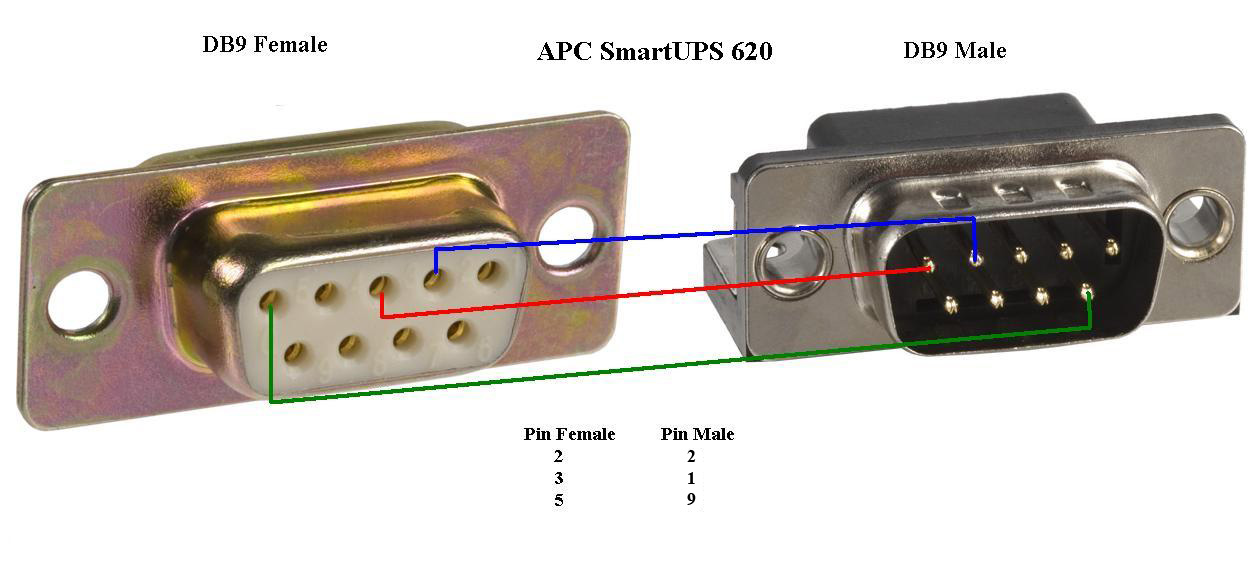
    I replaced my old APC SmartUPS 620 with an updated model. I had lost the serial cable that allows you to communicate with the UPS via a computer for the old unit. The new unit came with the serial cable and for a while I was looking for the correct pin out so I could build a cable myself. So I wanted to get the pin out documented. The cable is a male to female DB9 cable. Well I got my voltmeter and using the continuity setting I mapped the pinout. It would not be difficult to create this cable. Many of the cables DB9 serial cables I had laying around were female to female and it was hard finding a male end. Hopefully this will help others out there that need this cable and don’t want to pay $30 for it.
    UPDATE: I have updated the diagram based on the comments I got on this post. Apparently I counted the male pins incorrectly so I made the correction. Thanks for your feedback.apc-smart-ups-serial-pinout

    Tags: , , ,

  • 11Apr

    I am in the market for an HDMI Cablefor my digital TV so I can get the best quality out of the technology, and  I was shocked at the cost of the cables. There has been a debate whether high performance cables improves the quality of digital equipment the way it does for anolog equipment. I feel that many people don’t know the difference between analog and digital technology and people are being taken advantage of with clever marketing  because of their ignorance when it comes to digital technology. Analog technology uses waves to transfer information, while digital uses 1′s and 0′s. Electronic equipment need to interpret or translate analog signals based on the strength and clarity of the wave. In the square wave pictured, the areas at the top and bottom of the wave can be interpreted by electronic equipment as 1 and 0 respectively. If the signal is weak or has noise, the signal will not be interpreted correctly and the equipment will distort the output. That is why you hear hissing or static on audio tape. For analog the better the cables the less noise and stronger signal you will get which will improve the quality of the video and audio. However, digital is different. Analog Square waveIt is either on or off, there is no in between. Any conductor will allow a digital signal to be transmitted. It either gets there or it won’t. You would not see static or low quality with true digital audio and video. If the connection or cable is poor quality you would see flickering, pixelization, or hear hiccups in audio. The point here is not to be fooled by the marketing that would like you to buy $100+ gold plated cables. These performance cables are however,  important and will improve quality for analog audio and video but is not needed for digital equipment. If your signal are truly digital, like from a PS3 or Blu-Ray player, a “cheap” HDMI cable will do just fine. However do not confuse the quality of the cable with the performance of the cable. If the cable is made poorly or you don’t have a proper connection you will see significant quality deterioration in audio and video.


    Tags: , , ,

  • 18Mar


    I bought my Wii Fit for the Christmas holiday and I have been getting a surprisingly fun workout. I have found that every so often, especially while stepping on the board, the Wii Fit would get disconnected and I get the message “Communication has been lost, hit “A” and power button on the board”. I changed the batteries but that did not help. I did a little research and found some interesting clues to why it might be happening. I had a theory. Since the batteries are at the bottom of the board I thought the vibration of stepping plus the pull of gravity might be loosening the battery connections enough for the board to lose power temporarily. To test my theory I made a shim out of cardboard from a cereal box to hold the batteries firmly in place. This seemed to have done the trick since I have not had the problem since.

    Print out the template and trace the pattern on a piece of thin cardboard from a cereal box or shoe box. Cut out the darken shapes on the template. Place the cardboard on the battery cover. The tabs on the Wii Fit battery cover should fit through slots cut out of the template. I used 2 pieces of cardboard to hold the batteries snugly in place. You can use a piece of tape to hold the cardboard in place.
    wii-fit

    Tags: , , , ,

  • 14Mar

    Blackberry Curve

    I was getting very short battery life from my blackberry even after replacing the battery. After upgrading to blackberry software version 4.6 the battery life seems to be lasting much longer.  Before the upgrade my bettery would not last thorugh the night if it was not plugged in. Last night I forgot to charge it and I expected to see it dead as usual, but to my surprise it had practically a full charge and continued to have full battery the whole day. I am not sure if the new software has better battery management but I am very happy with my blackberry now that it is working as it should.

    Tags: , ,

  • 07Feb

    kindle2

    Engadget has some possible leaked photos of the Amazon Kindle 2 e-book reader. I may pick one up when they are out. Imagine having all your heavy textbooks you carried around in school condensed into a light electronic device. Not to mention magazines and newspapers reading during your commute. I do love holding books and flipping pages, but paper books might be going the way of the typewriter.

  • 08Jan


    The Nintendo Wii Fit is technically an accessory for the Nintendo Wii Game System. The Wii Fit consists of a pressure sensitive board that is used in conjunction with the Wii remote control. The board requires 2 AA batteries which are included and is quite sturdy.
    The Wii Fit tracks your weight and how long you are exercising each day, and let you know when your 30 minutes are up. It also calculates your body mass index (BMI) based on your age and weight. You can choose from yoga, aerobic, strength, or game workouts.
    It is possible to lose weight using the Wii Fit. If you use the Wii Fit for 20 -30 mins four to five times a week accompanied by a low calorie diet you will lose weight. The Wii Fit will track you’re progress and allow you to set goals and deadlines to give you additional motivation.
    My experience with the Wii Fit has been a good one. The exercises are varied enough to keep you interested and it makes exercise fun. Since you can compare stats with other Wii Fit users, competition is another motivating factor. I like being able to do different exercises depending on my mood and energy level. Just like any other piece of exercise equipment, consistency is key, but the Wii Fit’s fun activities keeps you coming back. Good Luck!

    Update:

    I had an issue with the Wii Fit board losing connection to the Wii but it appeared to be a battery problem. Here is how I fixed it.

    Here is a fun quiz on how many calories yo can burn on the Wii: http://electronics.howstuffworks.com/wii-calories-quiz.htm

    Tags:

« Previous Entries