• 22Feb


    The other day I was having some performance issues on my network, so I decided to see if there was an update to my Linksys router’s firmware. It’s a good idea to update your firmware occasionally since the manufacture’s can  fix bugs, add functionality, and increase security and performance. Check with your router’s documentation on how to update the firmware.
    On my Linksys router, I open a browser and type the router’s IP address (192.168.1.1 is the default on a Linksys router). Download the firmware file from the Linksys website. The router administration page displays, among other things, the current firm version of the router.  My router was version 1.02.6 and the latest was 1.02.7 so I decide to upgrade it. As part of  the firmware upgrade process the router will restart itself after the update.

    The upgrade was successful according to the status page. The router restarted and my web browser refreshed to the administration page that I was on before. Here’s where things got interesting.

    I noticed that after the upgrade my the firmware version on the router was 1.01.6 and not 1.02.7 as I expected. I thought that this was strange. “Did I download the wrong firmware file?”, I thought. So I re-downloaded the file and started the firmware upgrade process from the same page, just as I did before.

    This is when I noticed the wireless signal strength bars at the bottom of my taskbar were low. Usually they are full. That’s when I realized I was not connected to my router. I was upgrading my neighbor’s router!! Luckily it came back up fine.

    The mistake I made was upgrading my firmware via wireless. So when my router restarted, my computer automatically connected to a unsecured wireless connection. Coincidentally, this was the same router I was using and I was the screens that I would have seen on my router.  The lesson learned here is to connect your computer to a wired Ethernet port if you are going to upgrade you router.

    Tags: , ,

  • 21Jan

    funny-pictures-virus-cat
    Does your Windows machine feel more sluggish than usual? Are you getting little notifications on your taskbar that “You may not be protected”? You may have spyware or malware running a muck on your pc. Malware is getting increasingly crafty and find new places to hide and make it very difficult to get rid of. Some malware even disables your anti-virus protection to avoid being detected. The best way to deal with spyware and malware is stop them from running so anti-virus and anti-spyware programs can better clean your machine. Here are a few steps and places to check to stop spyware and malware before you run a scan.

    1. Boot into Safe Mode

    Booting into safe mode starts the computer with a minimum set of programs and drivers, which means some Spyware won’t run either. Restart the computer and hit the F8 key repeatedly before Windows starts. Choose Safe Mode when presented with a menu.

    2. Log in as administrator

    Don’t login with your normal user name. Your profile will automatically run some programs that you are not aware of and that includes malware. Once you have cleaned up you machine a bit you can then login with your account to finish cleaning. If you computer automatically logs in, Click start and Log Off. After you are at the logon screen, hit Ctlr+Alt+Del twice to bring up the user dialog box. Type in administrator and hit Enter since the password should be blank. If this doesn’t work, just login with you account. We’ll still get’em.

    3. Edit or Replace your host file windows\system32\drivers\etc\hosts file

    This file bypasses DNS and can be used by malware to redirect you to a malicious website. When you type citibank.com it could be taking you to a site that looks like citibank but isn’t. Unless you have a good reason to have any data in this file it is better to delete the contents of the file. Go to Windows\system32\drivers\etc\ and double click on the hosts file. Choose notepad as the program to open this with. Highlight and delete the information in this file and save it.

    4. Check the corners of you registry.

    Before editing the registry you should save a backup of it. http://support.microsoft.com/kb/322756

    Note: you need to log in to each user account on the computer and check the HKEY_CURRENT_USER registry key for each user since it will be different for each user that logs in or you risk getting infected again after that user logs on.

    [HKEY_LOCAL_MACHINE\Software\Microsoft\Windows\CurrentVersion\RunServices]
    “Program”=”c:\runfolder\program.exe”

    [HKEY_LOCAL_MACHINE\Software\Microsoft\Windows\CurrentVersion\RunServicesOnce]
    “Program”=”c:\runfolder\program.exe”

    [HKEY_LOCAL_MACHINE\Software\Microsoft\Windows\CurrentVersion\Run]
    “Program”=”c:\runfolder\program.exe”

    [HKEY_LOCAL_MACHINE\Software\Microsoft\Windows\CurrentVersion\RunOnce]
    “Program”=”c:\runfolder\program.exe”

    [HKEY_CURRENT_USER\Software\Microsoft\Windows\CurrentVersion\Run]
    “Program”=”c:\runfolder\program.exe”

    [HKEY_CURRENT_USER\Software\Microsoft\Windows\CurrentVersion\RunOnce]
    “Program”=”c:\runfolder\program.exe”

    [HKEY_CURRENT_USER\Software\Microsoft\Windows\CurrentVersion\RunServices]
    “Program”=”c:\runfolder\program.exe”

    These reg keys will run programs. The key should have a default value of Value “%1 %*”, if this is changed to “program.exe %1 %*”, the program.exe will be executed EVERYTIME an exe/pif/com/bat/hta is executed.

    [HKEY_CLASSES_ROOT\exefile\shell\open\command] @=”\”%1\” %*”
    [HKEY_CLASSES_ROOT\comfile\shell\open\command] @=”\”%1\” %*”
    [HKEY_CLASSES_ROOT\batfile\shell\open\command] @=”\”%1\” %*”
    [HKEY_CLASSES_ROOT\htafile\Shell\Open\Command] @=”\”%1\” %*”
    [HKEY_CLASSES_ROOT\piffile\shell\open\command] @=”\”%1\” %*”
    [HKEY_LOCAL_MACHINE\Software\CLASSES\batfile\shell\open\command] @=”\”%1\” %*”
    [HKEY_LOCAL_MACHINE\Software\CLASSES\comfile\shell\open\command] @=”\”%1\” %*”
    [HKEY_LOCAL_MACHINE\Software\CLASSES\exefile\shell\open\command] @=”\”%1\” %*”
    [HKEY_LOCAL_MACHINE\Software\CLASSES\htafile\Shell\Open\Command] @=”\”%1\” %*”
    [HKEY_LOCAL_MACHINE\Software\CLASSES\piffile\shell\open\command] @=”\”%1\” %*”

    Explorer start-up:

    Explorer runs your start menu and desktop and start every time you start windows. Check to see if the registry is pointing to explorer.exe or if it is pointed to another executable.

    [HKEY_LOCAL_MACHINE\SOFTWARE\Microsoft\Windows NT\CurrentVersion\Winlogon] Shell

    Active-X Component:

    This key starts the program that it has in its path BEFORE the explorer.exe file and any other program starts in your computer, so if you can understand why your antivirus can’t detect the virus when you boot up. It could even kill your antivirus software before your antivirus starts up.

    [HKEY_LOCAL_MACHINE\Software\Microsoft\Active Setup\Installed Components\KeyName]
    StubPath=C:\PathToFile\Filename.exe

    5. Start Up

    Here are the many places where programs get run at startup. Look at each item carefully. Find the name and path of the program that is being run. If you do not recognize it, search for it on the web to see if it is legit.

    Look in the following folders and check that the registry entry to verify that they pointing to the default location listed

    C:\windows\start menu\programs\startup

    * [HKEY_CURRENT_USER\Software\Microsoft\Windows\CurrentVersion\Explorer\Shell Folders]
    Startup=”C:\windows\start menu\programs\startup”

    * [HKEY_CURRENT_USER\Software\Microsoft\Windows\CurrentVersion\Explorer\User Shell Folders]
    Startup=”C:\windows\start menu\programs\startup”

    * [HKEY_LOCAL_MACHINE\Software\Microsoft\Windows\CurrentVersion\explorer\User Shell Folders]
    “Common Startup”=”C:\windows\start menu\programs\startup”

    * [HKEY_LOCAL_MACHINE\Software\Microsoft\Windows\CurrentVersion\explorer\Shell Folders]
    “Common Startup”=”C:\windows\start menu\programs\startup”

    6. Windows Scheduler:

    Scheduled Tasks are a place where normally you can set a program or command to run at a certain time or every 5 minutes, so it’s a good place to check.

    Go to Start-> Accessories-> System Tools-> Task Scheduler

    Some tasks don’t show up in the GUI so in a command prompt type: “at”

    Press enter.  You should see a list of tasks that are in the Task Scheduler GUI and some that may not.

    7. Batch files

    Open the following files in notepad and look for any odd programs that are listed. You can comment out the program by putting REM at the start of the line so it will be ignored.

    c:\windows\winstart.bat

    c:\Autoexec.bat

    Removing  Spyware and viruses

    After checking all these dark corners of you computer and removing any potentially malicious programs from starting, you are giving you anti-virus and anti-spyware software the best chance to find and remove the malware.

    AVG Free is a good free Antivirus program that detects many types of malware as well as viruses. Three effective anti-spyware programs are Spybot Search & Destroy, Malware Bytes, and AdAware. One pass of each of theses programs will clear your system of any unwanted processes slowing your machine down. Good Luck.

    Tags: , ,

  • 20Nov

    The Conficker worm aka Downadup worm continues to infect non-patched Microsoft computers a year after the initial outbreak. This worm scans your network and finds and infects other computers that are also not patched with the Microsoft MS08-067 critical patch. The worm can effect network performance since it floods the network with traffic while it scans  for other hosts to infect. It’s not in the news anymore since most companies have updated their systems, but just as many have not and are still vulnerable to attack. So get patched and update your anti-virus software.

  • 30Apr

    Have you noticed one of those impossible to read word-in-a-box prompts when signing up for a service to logging into a web site like Facebook or Digg. These are called captchas, and they are used to prevent spammers from automating the login process and creating thousands of accounts in minutes. The scripts the spammers use are not smart enough (yet) to solve the CAPTCHAS. However, a number of research projects have been able to beat the visual CAPTCHAs by using following methods

    1. Pre-processing: Removal of background clutter and noise.
    2. Segmentation: Splitting the image into regions which each contain a single character.
    3. Classification: Identifying the character in each region.

    The captchas are being  made increasing more difficult for a human to read.  In the very near future, a program will have an easier time solving the puzzle than humans will and the point of this additional security measure would be nullified.

    google_captcha

    Google has realized this and is trying a different and much needed approach. The new captcha method will require users to choose the correct orientation of a picture or which picture is a cat, rather than decipher a word. This method effective as it is difficult for a program to determine what should be right side up or the difference between a cat and a dog. Other methods make you solve a math problem or answer a common knowledge question.

    This makes much more sense to me than trying to figure out what the letters in the box are. The issue with these methods is the inability for visually impaired people to use these systems.  Such CAPTCHAs may make a site incompatible with Section 508 in the United States.  In order to comply with this regulation the site  should allow blind users to get around the captcha, for example, by permitting users to opt for an audio or sound CAPTCHA. It will be only a matter of time before the hackers try finding vulnerabilities in the audio captcha. Perhaps answering a question that a human would know and that can be provided in audio format is a way of providing security and accessibility.


    Tags:

  • 22Apr

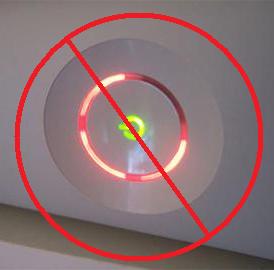
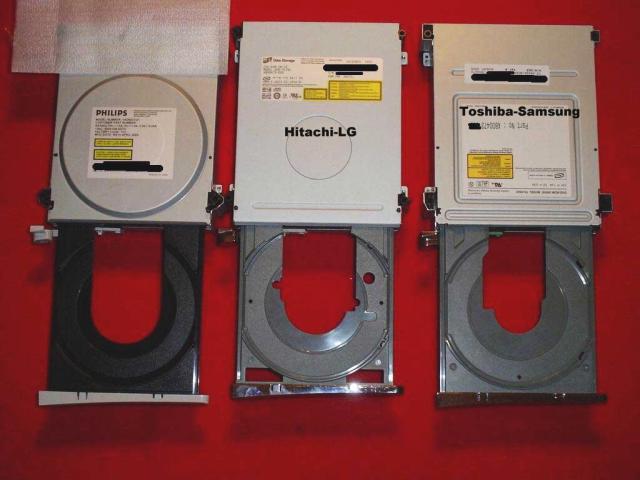
    I might have won a few battles with my xbox but I’m afraid I have lost the war. Aftter I thought i had fixed the rrod problem, it came back and I don’t think there is anything else I can do at this point but to buy a new xbox. I was thinking of getting an Xbox Arcade system. It is cheaper since it doesn’t come with a hard drive, but I can use the drive from the old system. The Xbox Arcade also has a HDMI connection which is a plus. I would also swap the DVD since it is flashed with the iXtreme 1.51 firmware. I am probably buy it from BestBuy since they have a good protection program. I am missing Halo Wars.

« Previous Entries